
Four customer feedback form templates, one for each moment that matters
Four customer feedback form templates to copy, for after a purchase, a support ticket, onboarding and a cancellation, with the reason for every question.
September 27, 2026
Godefroy
- A customer feedback form works best when it follows one precise moment: a purchase, a support ticket, the first week of use or a cancellation.
- Keep the form to three to five questions: one score, one or two closed questions about what happened, a request to follow up, and an open question shown only when the score calls for an explanation.
- Word the open question about the moment the customer just went through ("what made this harder"), since a question starting with "why" makes people defend their score.
- People skip the free-text box more than any other question. The answers that do come in are a few words long, so the reason behind a poor score comes from a follow-up conversation.
- Use the form alone when you need a number you can track. Add a short voice interview when you need to know what to change.
A customer feedback form is a short set of questions sent right after one moment of the customer relationship: a purchase, a support ticket, the first week of use, a cancellation. A good one asks for a score, adds one or two closed questions about what just happened and one open question, then asks permission to get back in touch. It takes a customer under four minutes to fill in. This post gives four templates you can copy, one per moment, with the answer format and the reason behind every question. It ends with the step most teams skip, following up with the customers whose answers worry you.
The five parts of a customer feedback form
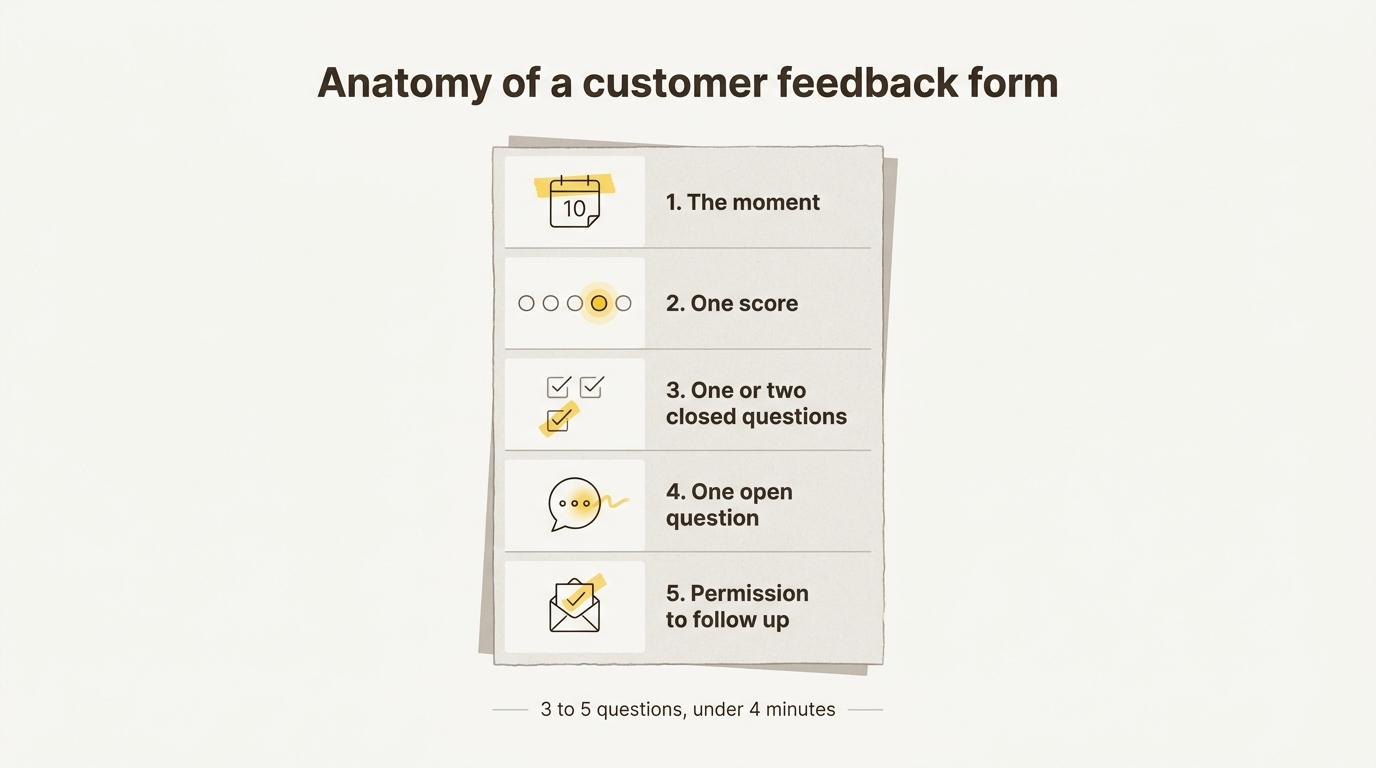
All four templates in this post have the same five parts, with one exception: the cancellation form asks for a reason where the others ask for a score.
- The form names the moment it asks about, such as “your order of 12 September” or “your conversation with Julie from support”. A form about “your experience with us” collects a general mood that nobody can act on.
- A single score, on one scale, gives you a number you can follow over time.
- One or two closed questions describe what happened: was the issue solved, what did the person come to do, which tool are they leaving for. With these answers, you can sort the scores by cause.
- One open question asks about the moment rather than about the relationship, and only the people whose score calls for an explanation see it.
- A yes or no question asks whether you may get back in touch through the contact details you already have. The answer tells you which customers you can contact to learn what the form left out.
Add a sixth question only if its answer could change one of your decisions. A question asked “to have the data” makes the form longer for everyone, for answers nobody reads.
Four customer feedback form templates, by moment
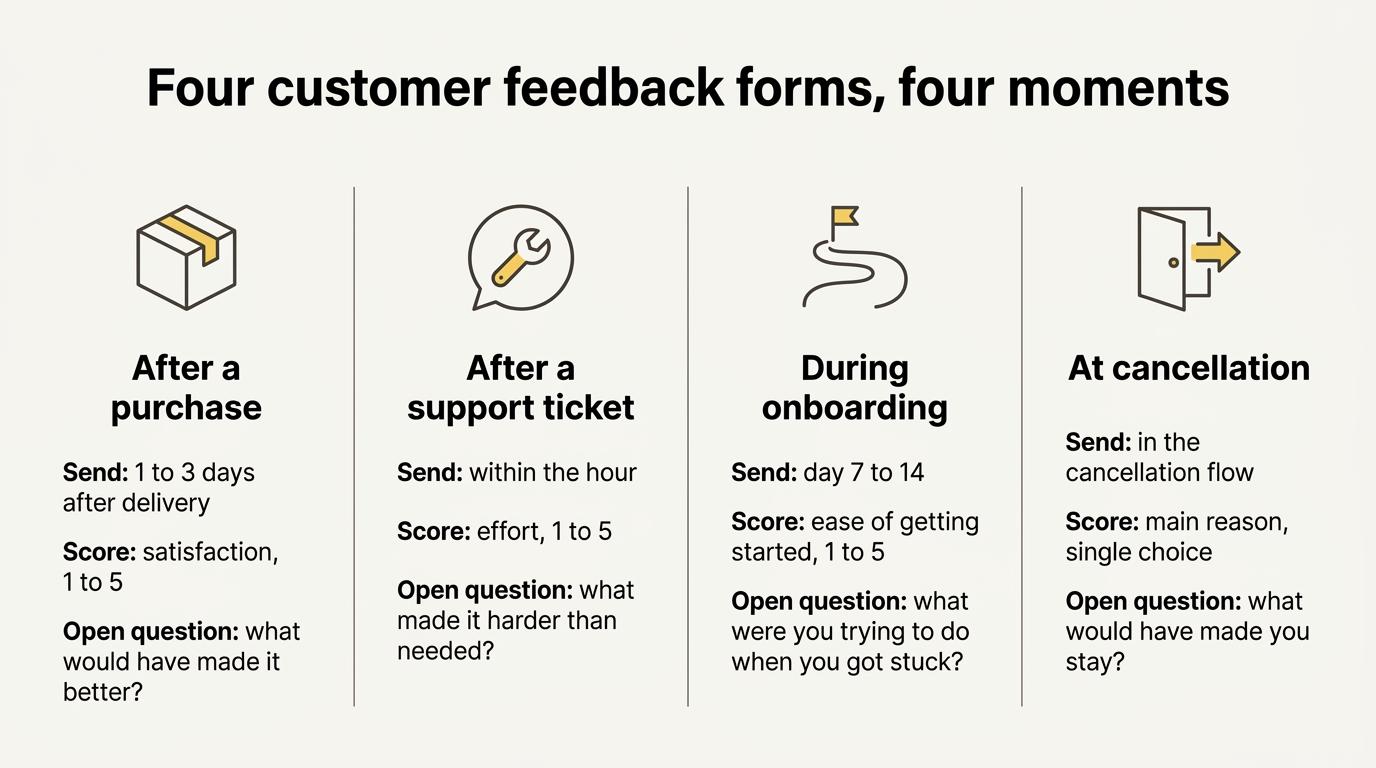
Each template fits a product or a service sold online. Swap the names in brackets, keep the formats, and send each form at the time given under its heading.
After a purchase
Send it one to three days after delivery, or after the first use for a subscription. Earlier than that, the customer has not used what they bought yet.
| # | Question | Answer format | Why it is there |
|---|---|---|---|
| 1 | ”How satisfied are you with your purchase of [product]?“ | 1 to 5, labelled from “very dissatisfied” to “very satisfied” | Gives a satisfaction score for this purchase alone |
| 2 | ”Did [product] match what you expected from its description?” | Yes / Partly / No | Tells you whether a disappointment comes from the product or from the promise made before the sale |
| 3 | ”What almost stopped you from buying?” | Single choice: price, delivery time, doubts about quality, nothing, other | Shows which objection your sales page leaves unanswered |
| 4 | ”What would have made this purchase better?” | Free text, shown when question 1 is 3 or below, or question 2 is not “Yes” | Asks the disappointed customers for the reason behind their answer |
| 5 | ”May we contact you about your answers?” | Yes / No | Tells you who you can follow up with |
After a support ticket
Send it within the hour after the ticket closes, while the person still remembers each step.
| # | Question | Answer format | Why it is there |
|---|---|---|---|
| 1 | ”Was your issue resolved?” | Yes / Partly / No | Separates the tickets that were closed from the problems that were actually solved |
| 2 | ”How much effort did you personally have to put forth to handle your request?“ | 1 (very low effort) to 5 (very high effort) | Measures effort, the dimension of service that predicts loyalty best |
| 3 | ”How many times did you contact us about this issue?” | Once / Twice / Three times or more | Counts repeat contacts, the biggest cause of effort |
| 4 | ”What made this harder than it needed to be?” | Free text, shown when question 1 is not “Yes” or question 2 is 4 or 5 | Names the step to fix in the support process |
| 5 | ”May we contact you about your answers?” | Yes / No | Tells you who you can follow up with |
The effort question comes from Matthew Dixon, Karen Freeman and Nicholas Toman, researchers at the Corporate Executive Board, a business advisory firm. They surveyed more than 75,000 customers after a service interaction and published the result in Harvard Business Review in 2010. Their Customer Effort Score predicted loyalty better than satisfaction and better than the Net Promoter Score on service interactions. They also found the biggest cause of effort: having to get back in touch because the first answer did not settle the problem. The question on the number of contacts counts exactly that.
During onboarding
Send it after seven to fourteen days, or right after the first action that shows someone has started using the product for real.
| # | Question | Answer format | Why it is there |
|---|---|---|---|
| 1 | ”What did you sign up to [product] to do?” | Single choice among the three or four main jobs, plus “other” | Groups every other answer by the reason the person came |
| 2 | ”Have you managed to do it yet?” | Yes / Not yet / I gave up | Measures activation as the customer sees it |
| 3 | ”How easy was it to get started?“ | 1 (very hard) to 5 (very easy) | Shows whether a new release makes getting started easier or harder |
| 4 | ”What were you trying to do when you got stuck?” | Free text, shown when question 2 is “Not yet” or “I gave up” | Names the step where new users stop |
| 5 | ”May we contact you about your answers?” | Yes / No | Tells you who you can follow up with |
After a month of use, you can send a question from Sean Ellis, the marketer who coined the term “growth hacking”. He asked it to judge whether a product had found its market: “How would you feel if you could no longer use [product]?”, answered with “very disappointed”, “somewhat disappointed” or “not disappointed”. Ellis compared about a hundred startups and set the threshold at 40% of users answering “very disappointed”. If you ask it on day three, the answers mean nothing, because nobody misses a product they have barely opened.
At cancellation
Show it inside the cancellation flow, then send the follow-up request by email the same day. This form swaps the score for a single reason, since a satisfaction rating from someone who is leaving tells you little you can act on.
| # | Question | Answer format | Why it is there |
|---|---|---|---|
| 1 | ”What is the main reason you are cancelling?” | Single choice: too expensive, missing feature, moving to another tool, no longer needed, too hard to use, other | Sorts cancellations by category, one reason per person |
| 2 | ”Which tool are you moving to, if any?” | Short text | Names the competitor you lose customers to |
| 3 | ”When did you first think about leaving?” | This week / This month / Earlier than that | Tells you whether to look at the last few days or at the whole relationship |
| 4 | ”What would have made you stay?” | Free text, optional | Collects the one fix the customer would have paid for |
| 5 | ”Would you take a five-minute call about it?” | Yes / No | Gives you the people to interview |
The single choice in question 1 records a category, ticked by someone already halfway out the door. To learn the sequence that led to the cancellation, from the first doubt to the click, you have to ask the customer, which is the job of the churn interview.
Format rules that keep the answers usable
Every template stays at five questions because each extra question costs you respondents. SurveyMonkey analysed about 100,000 of its surveys and found that drop-off rises fastest with each question up to about fifteen. In a companion analysis, respondents spent 75 seconds on average on the first question, introduction included, 40 seconds on the second and about 30 seconds on each of the next ones. At that pace, five questions take about three and a half minutes, which is already a lot to ask of a customer who never requested the form.
A few more rules hold across all four forms.
- Use one scale per form, with both ends labelled in words. When a 1 to 5 sits next to a 0 to 10 on the same form, people lose track of which scale they are answering, so a 4 no longer means the same thing from one question to the next.
- Show the open question only when the score calls for an explanation. Someone who gave a 5 rarely has anything to add, so for them the box only makes the form longer.
- Word the open question about the moment (“what made this harder”) rather than about the person (“why did you rate us 2”). A question starting with “why” makes people justify their score instead of describing what happened.
- Keep the wording identical from one month to the next. Changing a single verb is enough to make the answers impossible to compare with last month’s.
- Send the form while the moment is fresh: within the hour for support, within days for a purchase. A week later, people answer about their general opinion of you.
The answer formats have their own pitfalls, such as the tendency to answer yes to a yes or no question, or the midpoint of a scale that people pick when they have no opinion. We cover them, with examples, for dichotomous questions and for the other closed question formats.
The follow-up most teams skip
The open question of each template should give you the reason behind the score, yet respondents skip it more than any other. The Pew Research Center measured 18% nonresponse on open-ended questions against 1% to 2% on closed ones on a paid panel whose members are used to answering surveys. A customer with no incentive is likely to skip the box more often. The answers that do come in are short: “too expensive”, “slow”, “fine”. None of them says what to change.
The score alone does not tell you who will stay either. In the same Dixon, Freeman and Toman study, 20% of the customers who called themselves satisfied intended to leave, while 28% of the dissatisfied ones intended to stay. The score describes how the moment went. Whether the person stays depends on reasons the form never collected.
The permission question at the end of every template is there to go and get those reasons. The people who said yes are the ones to ask what “too expensive” was measured against, or which step of the setup made them give up. Teams rarely do it, because every one of those conversations needs a slot in two calendars and someone to take notes. Ten poor scores a week turn into ten calls nobody has time for.
We built Raconte, a tool where an AI runs voice interviews, to take that cost away. You write the follow-up interview once, as a short brief (“this customer rated the effort our support asked of them 4 or 5 out of 5, find out which step cost them the most”). Each person gets a link, opens it in their browser whenever it suits them and talks for a few minutes. The AI asks your questions and follows up when an answer stays vague, the way an interviewer would. You get the transcript, the audio, a summary and per-message sentiment once the conversation ends. Spoken answers also run longer than typed ones: Jan Karem Höhne, a survey methodologist, and his co-authors measured about 55 words per spoken answer against 21 per typed answer to the same open questions.
You can also automate the follow-up. When a poor score comes in, your automation (n8n, Make, or a script against the REST API) creates an invitation and emails the link, then a webhook sends the conversation back once the interview is over.
graph TD
  A["The customer submits the feedback form"] --> B{"Is the score poor?"}
  B -->|"No"| C["Thank them, count the score"]
  B -->|"Yes"| D{"Did they accept a follow-up?"}
  D -->|"No"| E["Read the open answer, if any"]
  D -->|"Yes"| F["Send a voice interview link the same day"]
  F --> G["Transcript and summary come back to the team"]
| Open question in the form | Phone call | Asynchronous voice interview | |
|---|---|---|---|
| Who answers | The people who fill in the box | The customers you manage to book | The customers who accepted the follow-up |
| Follow-up on a vague answer | None | Yes | Yes |
| Slot to book | No | Yes | No |
| Your team’s time per customer | Reading two lines | Half an hour | Reading the summary |
| What you learn | A category, sometimes a sentence | The full story | The full story |
When a form is enough
A form without any follow-up does its job in four cases:
- You track one number over time, like effort after support, and you only need to know whether it moves.
- You want to spot an incident early, such as a segment whose score drops overnight.
- You already shipped a fix and want to check that it worked.
- The volume is so high that one score per ticket is all anyone will read.
In all four, you already know what to do with the number the form measures. The form stops being enough the day you need to know why the number moved, since a satisfaction score only measures how the moment went. Until that day, Tally and Google Forms do the same job as Typeform for free. To pick the tool that sends the form, compare customer feedback tools by price and follow-up questions.
Where to start
Pick the moment where you lose the most customers today, usually onboarding or support, and copy that template. Send it for a month. Then pick ten customers who gave a poor score and agreed to a follow-up, read their answers and talk to them. Those ten conversations will show you which question to add to the form, or which one to drop.
Raconte gives you the first 60 interview minutes each month for free, with no card required, then bills each minute you use.
Frequently asked questions
What should a customer feedback form include?
Name the moment the form asks about, then ask for one score on a single scale. Add one or two closed questions describing what happened, one open question shown only to the people whose score calls for an explanation, and a request for permission to follow up. Five questions in total are enough for each of the four moments in this post.
How many questions should a customer feedback form have?
Three to five, depending on whether you ask one or two closed questions and whether the person sees the open one. SurveyMonkey found that respondents spend 75 seconds on average on the first question, introduction included, 40 seconds on the second and about 30 seconds on each of the next ones, so five questions already take about three and a half minutes. Only add a question whose answer could change one of your decisions.
What is the best format for a customer feedback form?
Build it around a single score on a labelled scale, 1 to 5 for satisfaction or effort. Add closed questions in single choice or yes or no form, then a single free-text field shown only when the score calls for an explanation. Keep the same scale and the same wording from one month to the next so the numbers stay comparable.
When should you send a customer feedback form?
Send it right after the moment it asks about: within the hour after a support ticket closes, one to three days after a delivery, seven to fourteen days into onboarding, and inside the cancellation flow. The later the form arrives, the more the answers reflect a general opinion rather than what happened.
How do you get customers to fill in a feedback form?
Keep it to five questions, say how long it takes in the first sentence, and ask about something that just happened to them. Show the open question only when the score calls for it, so a satisfied customer has nothing to type. Then act on the answers where customers can see it, because people answer the next form when the last one changed something.
Should a customer feedback form be anonymous?
Make it anonymous when the subject is sensitive or when the customer depends on you, since people soften their answers when their name is attached. For product feedback, a named form is more useful, because it lets you follow up with the people whose answers you need to understand.


