
Webhooks
Receive a POST request when an interview starts and when it completes.
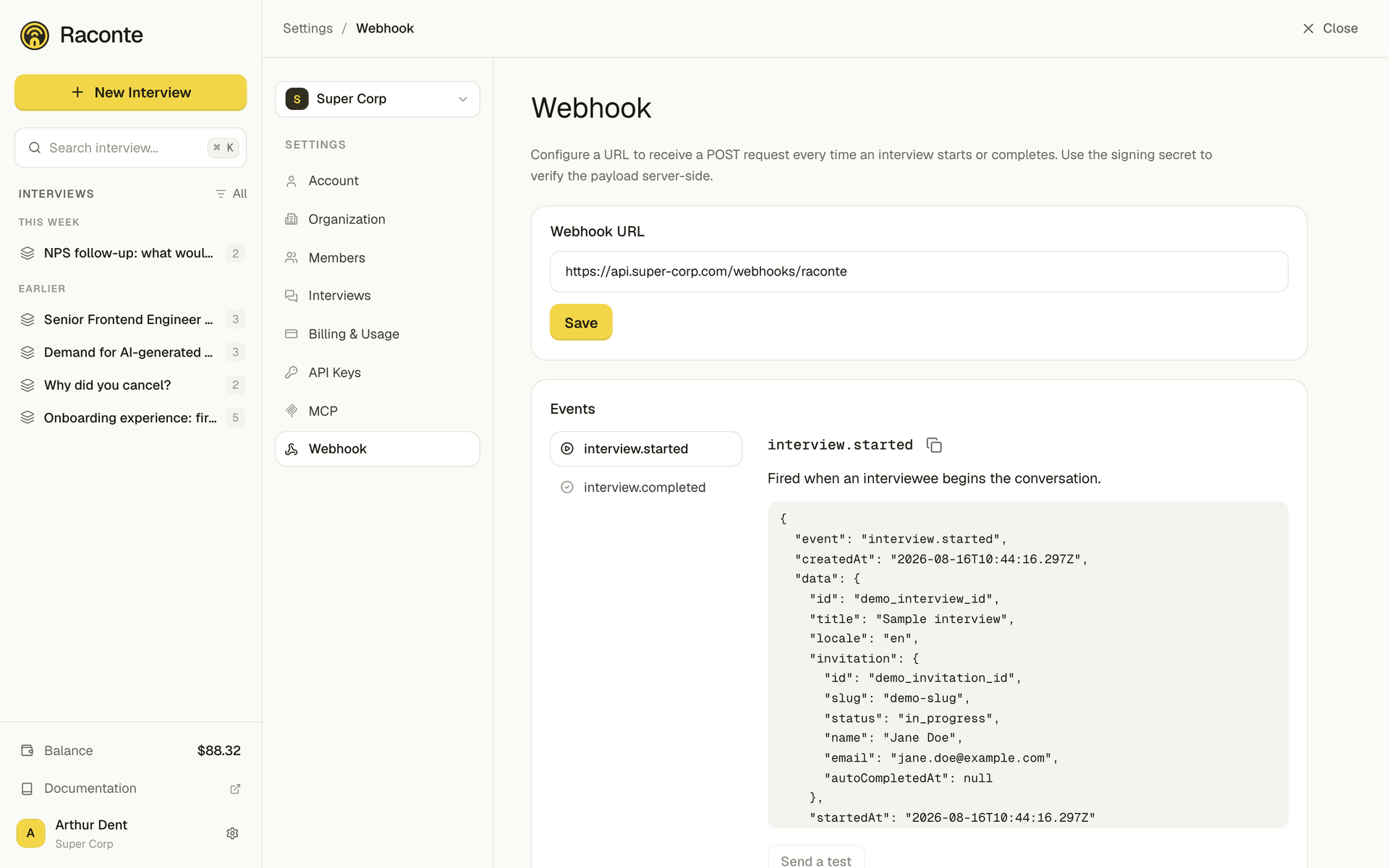
Raconte fires HTTP webhooks for two events per organization: interview.started and interview.completed. They are configured from Settings → Webhooks in the app, which also shows the exact payload of each event.
How delivery works
- One URL per organization receives every event. There is no per-event routing.
- The request method is always
POST, content-typeapplication/json. - Delivery is best-effort. Raconte does not retry on failure; it logs the response code and moves on.
- Delivery timeout is 5 seconds. Slow endpoints get an aborted request.
Headers Raconte sends:
| Header | Value |
|---|---|
user-agent | Raconte-Webhook/1.0 |
x-raconte-event | The event name, e.g. interview.completed |
x-raconte-signature | sha256=<hex digest> (only when a signing secret is set; see below) |
The payload envelope is always the same:
{ "event": "interview.completed", "createdAt": "2026-05-29T10:14:22.123Z", "data": { /* event-specific fields */ }}Verifying the signature
When a signing secret is configured, every request carries an x-raconte-signature header computed as:
HMAC-SHA256(secret, raw_request_body)Verify on your side by re-computing the HMAC with your secret and the raw body bytes (before any JSON parse), then comparing in constant time. A signature mismatch should be treated as a 401.
Example with Node.js + Express:
import { createHmac, timingSafeEqual } from 'node:crypto'import express, { Request, Response } from 'express'
const SECRET = process.env.RACONTE_WEBHOOK_SECRET!
function verifyRaconteSignature(rawBody: Buffer, header: string | undefined): boolean {  if (!header || !header.startsWith('sha256=')) return false  const expected = createHmac('sha256', SECRET).update(rawBody).digest('hex')  const provided = header.slice('sha256='.length)  const a = Buffer.from(expected, 'hex')  const b = Buffer.from(provided, 'hex')  // Length check first: timingSafeEqual throws on unequal-length inputs.  if (a.length !== b.length) return false  return timingSafeEqual(a, b)}
const app = express()
// IMPORTANT: keep the raw bytes around. JSON.parse(rawBody.toString()) is fine// for handling, but the HMAC must be computed over the exact bytes sent.app.post(  '/webhooks/raconte',  express.raw({ type: 'application/json' }),  (req: Request, res: Response) => {    const signature = req.header('x-raconte-signature')    if (!verifyRaconteSignature(req.body as Buffer, signature)) {      return res.status(401).send('invalid signature')    }    const payload = JSON.parse((req.body as Buffer).toString('utf8'))    // payload.event is 'interview.started' or 'interview.completed'    // payload.data contains the event-specific fields documented below.    res.status(204).end()  },)
Generate (or regenerate) the secret from Settings → Webhooks. Regenerating invalidates the previous one immediately; any server still using the old secret will start rejecting requests.
interview.started
Fired the first time an invitee sends a message to the AI on a given invitation (the call moved out of READY into IN_PROGRESS).
data payload:
| Field | Type | Description |
|---|---|---|
id | uuid | Interview id |
title | string | null | Interview title |
locale | string | Interview language |
invitation | object | The specific invitation that started (fields below) |
startedAt | ISO 8601 string | When IN_PROGRESS was reached |
The invitation object holds id, slug, status, name (invitee name, or null), email and autoCompletedAt (always null here; only set on interview.completed).
Example envelope:
{ "event": "interview.started", "createdAt": "2026-05-29T10:14:22.123Z", "data": { "id": "demo_interview_id", "title": "Sample interview", "locale": "en", "invitation": { "id": "demo_invitation_id", "slug": "demo-slug", "status": "in_progress", "name": "Jane Doe", "email": "jane.doe@example.com", "autoCompletedAt": null }, "startedAt": "2026-05-29T10:14:22.000Z" }}interview.completed
Fired once the invitee ends the call (status moves to COMPLETED). The webhook waits for the AI insights pass to settle so the summary and per-message sentiments ship with the payload when they are available. An insights failure does not block delivery; in that case summary is null and message sentiment fields are null.
data payload:
| Field | Type | Description |
|---|---|---|
id | uuid | Interview id |
title | string | null | Interview title |
locale | string | Interview language |
invitation | object | The specific invitation that completed (fields below) |
durationSeconds | number | Total duration of the recorded audio segments of the interview, in seconds |
completedAt | ISO 8601 string | When COMPLETED was reached |
summary | string | null | Generated summary of what the respondent said (when available) |
messages | array of {role, content, createdAt, sentiment} | Full transcript, chronological |
The invitation object holds id, slug, status, name (invitee name, or null), email and autoCompletedAt. autoCompletedAt is an ISO 8601 string when the interview was finalized automatically after 3 hours of inactivity (the invitee never ended it, so the transcript may be incomplete), and null when the invitee ended it themselves.
Example envelope:
{ "event": "interview.completed", "createdAt": "2026-05-29T10:21:07.541Z", "data": { "id": "demo_interview_id", "title": "Sample interview", "locale": "en", "invitation": { "id": "demo_invitation_id", "slug": "demo-slug", "status": "completed", "name": "Jane Doe", "email": "jane.doe@example.com", "autoCompletedAt": null }, "durationSeconds": 184, "completedAt": "2026-05-29T10:21:07.000Z", "summary": "Jane appreciated the onboarding flow but flagged the pricing page as confusing.", "messages": [ { "role": "assistant", "content": "Hi Jane, thanks for taking the time. How was your first week with the product?", "createdAt": "2026-05-29T10:18:07.000Z", "sentiment": null }, { "role": "user", "content": "Onboarding felt smooth, but I got stuck on the pricing page.", "createdAt": "2026-05-29T10:19:07.000Z", "sentiment": "neutral" } ] }}Testing your endpoint
From Settings → Webhooks, the Send a test button fires a mock payload of the selected event against your configured URL. The mock envelope adds "test": true to the data block so you can branch on it during development.
Any response code in the 200..299 range counts as delivered. Anything else is logged on Raconte’s side but the event is not retried.